Payment operations
Telehealth payments: when to hold a card and when to charge it
When should you charge a patient whose treatment is still under review? A guide to card holds, expired payments, and cancellations for telehealth owners.

10 min read

For telehealth owners and operators
Put a hold on the card, then charge after clinical approval
If your medication charge depends on a clinician approving treatment, you can separate checkout from collection. Place a temporary hold on the patient’s card at checkout, then collect once the clinician approves and your other billing conditions are met. You also need a plan for patients who are not approved, prices that change, and holds that expire while review is still open.
Consider a patient who completes checkout on Monday. On Wednesday, the clinician asks for more information. The patient’s bank shows a pending payment, while your support team sees an order marked “pending.” Before anyone can explain what happens next, they need to know whether the card was charged or only placed on hold.
This is where telehealth payment authorization and capture matter. Your team needs to see the clinician’s decision, the payment status, and the pharmacy’s progress on the same order. Our guide to how ScalerMD works explains how those parts of the patient journey connect.
What is the difference between authorization and capture?
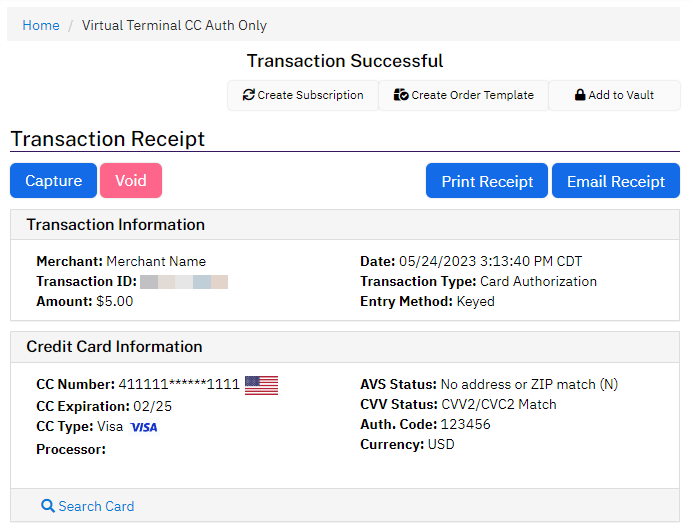
Authorization places a temporary hold on funds. Capture tells the payment processor to collect against that hold. The money then follows the processor’s settlement and payout schedule. NMI describes capture as marking an authorized transaction for settlement, so a successful capture does not mean the money is already in your bank account.[1][7]
 View full-size
 This article covers medication orders paid before fulfillment, where collection depends on clinical approval. Consultation fees and memberships may be charged at different times. For each charge, decide who collects it, when it is due, and what happens if the patient cancels. Your processor must approve your business and support separate authorization and capture for the payment method you use. Start with our payments and checkout guide to check that setup.
Should you save the card instead?
Saving a card and charging later may fit better if you do not know the final price or how long review will take. Stripe’s Setup Intents let you save payment details without charging or reserving funds. You need the patient’s permission to use the card later, and they may still need to return to verify the payment.[6]
Compare the options using your own review times and how often prices change. Also consider whether your team can reach patients who need to complete payment again. A saved card does not guarantee payment, and a hold will not stay open indefinitely.
What should happen between checkout and the pharmacy?
For the prepaid medication order described here, we recommend the sequence below. Adjust the point of collection to match your actual offer and the terms the patient accepts.
- Hold the fundsSave the amount, transaction number, and hold deadline.
- Clinical reviewWait for the clinician’s decision on this order.
- Check the orderConfirm the price, billing terms, and any cancellation.
- Collect paymentCheck that the processor confirms capture.
- Send to pharmacyTrack whether the pharmacy accepts the order.
Keep the payment attached to the right order
Give staff access to the order number and its payment, clinical case, and pharmacy references. Record the amount and currency, the terms the patient accepted, and the hold deadline when the processor provides it. Keep clinical details out of payment descriptions.
Check what the patient owes before collecting
Confirm that approval applies to the current order, the price matches what the patient agreed to, and the patient has not canceled. The hold must still be valid. If your terms require the pharmacy to confirm availability or accept the order before charging, wait for that too.
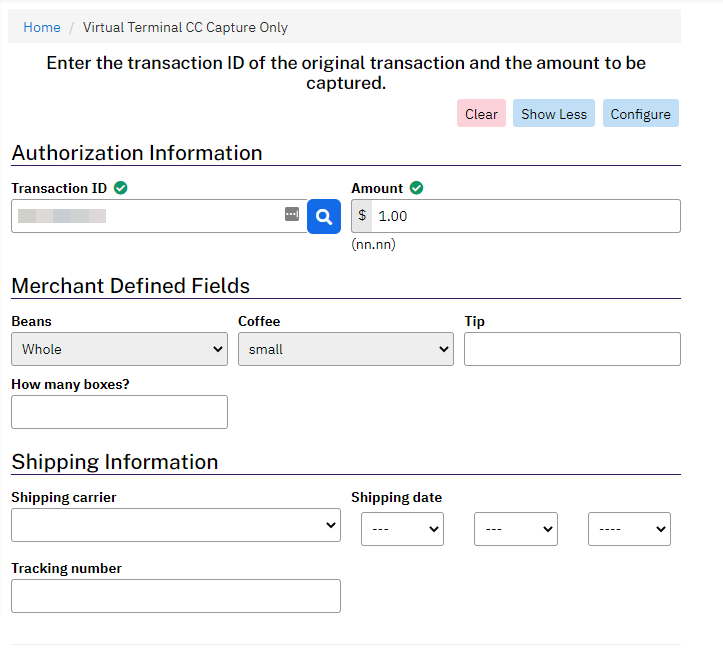
Your payment system must also confirm that the transaction is ready for capture and specify the amount to collect. In Stripe, those are the requires_capture status and amount_to_capture field. A clinician’s approval cannot tell you whether the payment is ready.[2]
 View full-size
 Follow up if a paid order stalls at the pharmacy
A captured payment does not tell you whether the pharmacy accepted, dispensed, or shipped the order. Track those steps separately and assign someone to follow up when a paid order has no pharmacy response. The clinical approval and order details must still be valid when you send it. Our order status guide explains how to identify which step needs attention.
What to do when an order changes or a payment fails
The next action depends on what happened to the money. Stripe lets you cancel an uncaptured payment or refund a completed one. NMI also allows some captured payments to be voided before settlement. Check the transaction’s current status and your processor’s rules before choosing an action.[3][7]
| What happened | Card status | What to do | Follow up |
|---|---|---|---|
| Clinician approves; price stays the same | The card hold is still active. | Check the order and agreed billing terms, then capture the payment once. | Confirm payment before sending this prepaid order for fulfillment. |
| Clinician does not approve treatment | The card has a hold, but no medication charge is due. | Cancel or void the hold. Handle any separately agreed consultation fee under its own terms. | Close the medication order and tell the patient the hold is being released. |
| Clinician needs more information | The hold is active, with a deadline approaching. | Leave the order pending and watch the deadline. Do not charge just to keep the hold from expiring. | Request the missing information through the clinical team. |
| Approval arrives after the hold expires | The original hold can no longer be used. | Confirm the old attempt has ended, then arrange a new payment with the patient’s permission. | Wait for confirmed payment before releasing the order. |
| The final price is lower | The hold covers more than the patient now owes. | Confirm the revised purchase and capture the lower amount if the processor supports it. | Record the final price and check that the unused part of the hold is released. |
| The final price is higher | The hold does not cover the new price. | Get the patient’s agreement to the new amount and arrange payment. | Resolve the original hold so both payment attempts cannot be collected. |
| The payment screen times out | You do not yet know whether capture succeeded. | Check the transaction with the processor before trying again. | Pause further charges and fulfillment until the result is clear. |
| Patient cancels after being charged | Money was collected; check whether it has settled. | Use a void if the processor still allows it; otherwise use the refund process. Confirm the result. | Contact the pharmacy too. Returning the money does not stop a shipment. |
Keep billing problems separate from treatment decisions. If a card fails, staff should see that the order needs payment. If the treatment plan changes, it needs the appropriate clinical review and the patient’s agreement to any revised purchase.
How do you prevent duplicate charges?
A slow response can leave your team unsure whether a payment went through. Before trying again, check the transaction with the processor. A timeout does not prove that the charge failed.
Ask your implementation partner to show what happens when the same payment request is sent twice. Stripe supports a request identifier, called an idempotency key, that lets the system recognize a repeat request. Your system also needs its own record of the attempt because the processor’s protection has time limits.[5]
Payment notifications can arrive twice or out of order, as Stripe documents. An older message should not make a completed payment look unpaid. Your team needs to check uncertain results against the processor’s current record.[4]
Technical checks to share with your implementation team
Give each capture its own operation ID and allow only one worker to process it. Reuse the same idempotency key and request parameters when retrying that operation. Keep your record longer than the processor’s retry window, and create a separate record for each new authorization. Verify webhook signatures, record event IDs, and use a durable queue so notifications survive a restart. Reconcile uncertain results with the processor before updating the order.
What should support staff see?
- Clinical review
- Is review pending, does the clinician need more information, or has a decision been made? Show the decision, its reference, and when it was recorded.
- Payment
- Is the card on hold, awaiting capture, charged, expired, or voided? Is a refund pending? Keep the amount and reference for every attempt.
- Pharmacy
- Has the order been sent, accepted, or shipped? Show any problem, the pharmacy’s response, and the tracking reference.
These are suggested labels; your partners may use different names. Agree on what each status means during integration setup. Staff should be able to see “clinically approved” and “payment expired” together without mistaking either for a completed order.
ScalerMD’s NMI payment code has separate actions for authorization, capture, voids, and refunds. That informed this guide, but code alone does not show how a particular client’s setup behaves. When evaluating our platform for telehealth businesses, ask us to demonstrate the full payment process in the setup you plan to use.
What should you test before taking patient payments?
Ask your implementation team to run these cases with test patients and processor test tools. Write down what should happen, what actually happened, and who will fix any problem. Our prelaunch testing guide covers the rest of the patient journey.
- An approved order produces one confirmed payment and reaches fulfillment once.
- When treatment is not approved, the medication hold is released. Any separately agreed service fee follows its own billing terms.
- An expired hold cannot release an order. A replacement payment appears under the same order, with both attempts accounted for.
- A lower price uses partial capture where supported. A higher price requires the patient to agree to the revised purchase and payment.
- A repeated request, lost response, or notification arriving out of order does not cause a second charge or pharmacy submission.
- If a patient cancels while capture is processing, staff check the final payment result and stop the pharmacy order or escalate it.
- If the pharmacy cannot fulfill a paid order, or a refund fails, the problem stays visible with someone assigned to resolve it.
- If the system restarts after the processor collects payment but before the order updates, it restores the correct payment status.
Watch where orders get stuck
Track the time from card authorization to clinical decision, holds that expire before a decision, and the time from approval to capture. Also keep counts of payments with unknown results and paid orders awaiting a pharmacy response. Review these alongside cancellations and refunds to find slow handoffs. They should never become targets that pressure clinicians to approve treatment.
When calculating an expired-hold rate, use a group of successful authorizations whose holds have all ended. Count how many expired without being captured, then divide by that group’s total. Including fresh holds still waiting for review would make the rate misleading.
If you are choosing an implementation partner, our telehealth platform comparison covers the broader launch responsibilities. During a demo, ask the partner to walk through a delayed review, an expired hold, and a cancellation after payment. You should leave knowing who handles each case and what the patient will be told.
Frequently asked questions
Can a telehealth business authorize a card before clinical approval?
Yes, if your processor has approved your business and the payment method supports a separate hold and capture. Explain the hold and charge timing at checkout. The clinician still decides whether treatment is appropriate; a successful card hold does not authorize prescribing or dispensing.
What happens if clinical review takes longer than the payment hold?
Check the original payment with the processor. If the hold has expired, arrange a new payment using the saved card with the patient’s permission, or ask them to return to checkout. Keep the order awaiting payment until you confirm the result. Do not charge early just to beat the deadline.
Is releasing a card hold the same as issuing a refund?
No. Releasing a hold removes the authorization to collect money that has not yet been charged. A refund returns money from a completed charge. Some processors also let you void a captured payment before it settles. Check the transaction’s current status to choose the right action.
Does this workflow automatically cover subscription refills?
No. Check the clinical requirements, cancellation status, and fulfillment conditions for each refill, and keep a separate payment record for each cycle. The first successful payment does not establish eligibility for treatment or permission for every later charge.
Behind the research
Sources & methodology
Sources reviewed
We used Stripe and NMI documentation and reviewed ScalerMD’s payment code. Numbered citations identify the processor sources. The recommended workflow, example order, and test checklist are our analysis. We did not measure customer results or audit a live deployment. Stripe examples explain payment behavior; each business still needs processor approval. Licensed professionals make clinical decisions. Your billing terms and processor setup determine when and how you can collect payment.
- Stripe: Place a hold on a payment method
Separate authorization and capture, transaction-specific expiration, and partial capture behavior.
- Stripe API: Capture a PaymentIntent
Capturable status, amount_to_capture, and capture results.
Back to:Capture eligibility - Stripe: Refund and cancel payments
Cancellation versus refunds and tracking refund outcomes.
Back to:Void and refund rules - Stripe: Receive events in your webhook endpoint
Signature verification, duplicate delivery, event ordering, and asynchronous processing.
Back to:Webhook delivery - Stripe API: Idempotent requests
Reusing a request key for the same operation and the limits of processor deduplication.
Back to:Retry protection - Stripe: The Setup Intents API
Saving payment details separately from charging, permission for later use, and authentication recovery.
Back to:Saving a card - NMI: Credit Card Processing Virtual Terminal Guide
Authorization, capture, settlement, void, and refund terminology; used to distinguish NMI behavior from Stripe examples.
Published . Updated .
Revised for clarity on September 24, 2026. Processor documentation checked the same day. The recommended workflow and examples are ScalerMD’s guidance; example orders are made up.
Suggest a correctionWho’s behind this article
Jonathan Saeidian is the founder of Brenton Way, Bridge, and Growth Virality. At Brenton Way, he leads growth strategy spanning paid media, SEO, content, conversion optimization, and analytics for brands in health, beauty, and e-commerce. His ScalerMD Research articles examine telehealth platforms through a business and growth lens: how technology choices, launch responsibilities, and acquisition workflows fit together for founders and operators.